🎼TouchMe — tuning
Pick a scale and a key — with the touch rings on the device or in the browser. The symbols on the back explained.
Parent page: TouchMe — complete guide. Start there if you have not done the first-time setup.
TouchMe ships tuned to C major, playing notes from C3 (MIDI note 48) up to C6 (MIDI note 84). You can pick one of 12 scale presets and move the root note in two ways: with the touch rings on the back of the device, or on the web settings page. Either way, the choice is saved on the device.
Change the scale on the device
You do not need a computer to change the scale or the key.
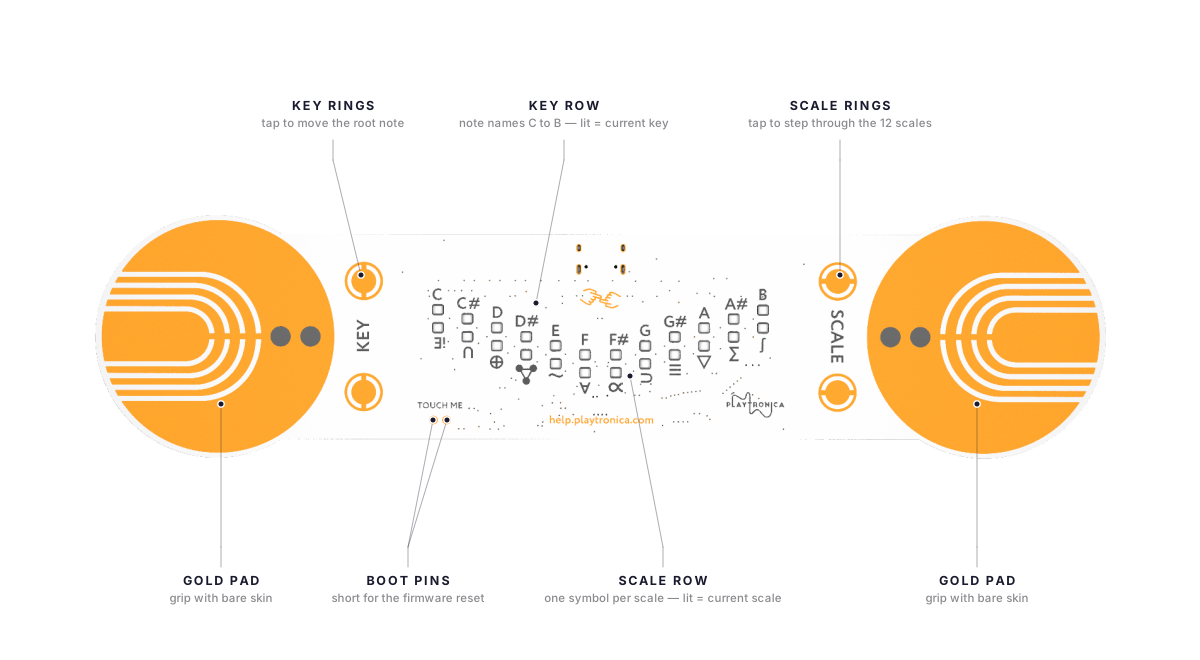
The back of the device has two touch rings labelled SCALE and two labelled KEY. Tap one SCALE ring to step forward through the 12 scales, the other to step back. The KEY rings move the root note the same way. Every tap is saved immediately.
The two rows of small windows between the rings show the current state. The top row sits next to the note names C to B and shows the key. The bottom row sits next to the printed symbols and shows the scale — one symbol per preset, in the table below. While you play, the windows light up following the pitch; lift your hands and they return to showing the key and the scale.
When Custom range is on (set on the web settings page), the KEY rings are disabled — the range you set replaces the key.
Open the tuning page
- Plug TouchMe into your computer.
- Open settings.playtronica.com/#/touchme in Chrome.
- Click Allow on the MIDI permission prompt.
If your device does not appear in the device dropdown, close the tab, plug in the device, and open a new tab. The browser scans for MIDI devices when the page loads.
Pick a scale
A scale is a set of notes that work together. TouchMe has 12 scale presets. The table lists every preset in order, with the symbol printed on the back of the device and the notes each preset plays in the key of C. The list comes from the device firmware, so this is exactly what the device plays.
| # | Preset | Symbol on the device | Notes in the key of C | Feel |
|---|---|---|---|---|
| 1 | Major | ∃! | C D E F G A B | bright, predictable, classic |
| 2 | Minor (natural minor) | ∩ | C D Eb F G Ab Bb | moodier, still familiar |
| 3 | Chrom (chromatic) | ⊕ | all 12 semitones | maximum freedom, hardest to control |
| 4 | Dorian | three linked dots | C D Eb F G A Bb | minor with a lift; fits jazz |
| 5 | Mixolydian | ∿ | C D E F G A Bb | major with a soft edge; fits rock and blues |
| 6 | Lydian | ∀ | C D E F F# G A B | floating, dreamy major; this preset plays both the fourth and the raised fourth |
| 7 | Wholetone (whole tone) | ∝ | C D E F# G# A# | eerie and dreamlike |
| 8 | Minblues (minor blues) | ⊃ | C Eb F F# G Bb | the classic blues sound |
| 9 | Majblues (major blues) | ≡ | C D Eb E G A | brighter blues |
| 10 | Minpen (minor pentatonic) | ∇ | C Eb F G Bb | five notes, darker mood |
| 11 | Majpen (major pentatonic) | Σ | C D E G A | five notes, every touch sounds intentional. Best choice for first-time players. |
| 12 | Diminished | ∫ | C D Eb F F# G# A B | tense, cinematic |
The numbers match the order in the Scale dropdown on the settings page and the order of the symbols on the device. On the back, the symbols run left to right under the note names: ∃! (Major) sits under C, ∫ (Diminished) sits under B. The lit window next to a symbol marks the active scale.
TouchMe does not have a Phrygian preset or a custom scale editor. To play notes outside these presets, use the custom note range (below) or remap incoming notes in your DAW.
How TouchMe picks a note
TouchMe divides its note range into equal zones — one zone per scale note. Light contact plays the low notes. More skin and more pressure play the higher notes. A preset with fewer notes (pentatonic has five per octave) gives each note a wider zone and more control. Chromatic has twelve narrow zones, which is why it is the hardest to play.
Pick a key
The Key dropdown moves the root note — the lowest note of the range. It offers C3 to B3 (MIDI notes 48 to 59). C major and G major use different notes but have the same melodic feel; the key changes the pitch, not the character.
A reasonable starting point: Majpen (major pentatonic) in the key of C. Easy on the ear and fits most synths in our online library.
Save the choice
Click Send to push the mapping to TouchMe. The choice is stored on the device. When you plug TouchMe into a different computer tomorrow, the scale is still there. You do not need to set it again.
Other settings on the page
- Velocity — the loudness sent with every note. The default is the maximum, 127.
- Humanize — when on, each note gets a random velocity between the minimum and maximum you set. Adds movement to long sessions.
- Custom range — replace the default C3–C6 range with any range from MIDI note 0 to 127. A wider range fits more notes. A narrower range gives each note a wider zone and makes playing more precise.
- MIDI channel — TouchMe sends on channel 1 by default. Change it here (1–16).
- Sensitivity — how strongly the device reacts to light contact. Adjust it if notes trigger too easily, or if you need firm pressure to get sound.
For MIDI output details and performance setups, see TouchMe deep dive.
If the page does not see the device
- Use the right browser. Chrome only. Safari and Firefox do not support Web MIDI.
- Plug in the device first, then open the page. Not the other way around.
- Check MIDI permission. If you clicked Block on the MIDI prompt earlier, the browser remembers. Open browser settings → Site Settings → MIDI → find
settings.playtronica.com→ set to Allow. - If nothing works, see the firmware reset guide. The Nuke recovery brings the device back to a known state.
Ask the community
🤝 Other Playtronica users have probably hit this before. The Playtronica Friends Facebook group has 4,400 members and is the fastest source of creative and technical help. Search the group's history first (use the magnifying glass at the top — try
playtron mobile no sound,all leds lit,touchme biotron no sound,koala sampler midi, or whatever fits your problem). If your question is not already answered, post a new one with a[Device]prefix in the title. See the community page for what to ask there and what to email instead.
Still stuck
Email [email protected] with the subject TouchMe tuning and a screenshot of the settings page. We aim for 24 hours, but a reply may take up to 3 business days.